What's new in Kindo 2026
Keep up to date with our latest updates and enhancements, added each month.
Select a month above to jump straight to that section.
Have feedback or a request you'd like to share?
Email support@kindo.co.nz with the subject 'Kindo Feedback' — we’d love to hear your ideas!
September 2026
A clearer view of your Point of sale transactions
Reporting
Your Point of sale reports now show more detail. POS Reconciliation and Transaction history include student and caregiver names, full item breakdowns, and more ways to filter, including by payment type, date, and who processed the transaction. You can check your takings match or see what a payment was for without opening another page. Open Reporting and choose View new reports to see them. Your classic reports are still available too.
August 2026
Faster re-ordering for families
Ezlunch
Hub
Families can now repeat a recent Ezlunch order using Order again from the Home screen, a quick way to place the same order without re-selecting all options and choices again.
Available on Kindo web and in app version 3.5.9 or later.
Ordering for the right school
Platform
When a student is attending one school and pre-enrolled at another, families now see a prompt to confirm which school they're ordering for. This gives peace of mind that each order is directed to the right school, and saves you sorting out missing orders and lunches on the day.
Families can now review their order details and answers
Transactions
On the Transactions page, families can now use See more to read an item's full description and View answers to see the answers they submitted. They can check these details themselves, which means fewer queries coming to your school.
Easier-to-read item names on printed labels
Labels
Item names now appear in a larger font on the PDF and 8-per-page label templates. This makes labels easier to read at a glance, so orders can be picked and packed faster. Label size and layout remain the same.
A new look for Kindo
Home screen hub
Kindo is getting a fresh new look which is making school admin even easier.
What’s new for your school?
- Better visibility of your ‘Message of the Day’ and welcome image
- A colour picker to customise your school page even more
- Your school is always visible with one view for families accessing multiple schools
- A design that makes it easier for your families to take action
What's new for your families?
- A clean, modern look that's easier to navigate
- A ‘Hub’ that brings outstanding requests from every school into one place
- Better visibility of key payments and forms
- A ‘Pay All’ option, so families can pay everything at once (with the option to deselect items)
- Clearer naming for wallet top-ups, autopay, and transaction history
- A recognisable home for your school, making key messages and events easier to see
We are proactively communicating with caregivers about this update. They will automatically be transitioned to the new experience and there is nothing they need to do.
Support for students with a single name
SMS
Students who have only one name are now supported. Enter a tilde (~) in the first name field in your SMS so the name comes through correctly.
On the few forms that require both a first and last name, the single name may appear twice. Everywhere else, it shows once.
Empty School Managed Accounts clear automatically
SMA
School Managed Accounts (SMAs) with no students attached are now removed automatically. This keeps your list free of SMAs that are no longer needed, freeing up email addresses so families who have moved schools can use them to set up new Kindo accounts.
July 2026
School Managed Accounts now show clearly on Connect
SMA
Connect
School Managed Accounts are now clearly labelled “SMA” on the Connect page. This makes it easier for you to identify these accounts and access donation receipts for caregivers.
Search Payable status by Student ID
Payable status
We've added a student ID column to Payable Status. This makes it easier for you to find the right student when two or more students share the same name.
Point of sale settings reset after each payment
Point of sale
Once a payment is registered on Point of sale, the settings return to their defaults, reducing the risk of errors or accidental repeat payments.
On demand SchoolBridge sync
SchoolBridge integration
You can now re-sync your SchoolBridge integration whenever you need to, making it easier to clear mismatches without contacting our Support team.
June 2026
Report and reconcile by GL code
Reporting
GL codes can now be used to filter and report in the Financial performance report, on the Summary and Trend analysis tabs. This gives finance and admin teams a consistent way to report and reconcile by GL code.
Caregivers stay connected to students who have left
Kamar integration
Hero integration
When a student has left, caregivers can still see them and pay outstanding requests. You can also create a School Managed Account without contacting the Support team. Left students with no outstanding payables stop appearing in Kindo after three months, while anyone with payments owing remains until cleared.
Set multiple prices for one item
Item editor
We've added priced choices, so you can set a different price for each choice within one item, instead of setting up separate items. It's also quicker for families, who can find and select the right priced choice from one place. See Adding priced choices for how to set them up.
Autopay for payment requests
Caregiver wallet
Caregivers can now set up Autopay to allocate funds to their school payment requests automatically — a set-and-forget option they control. They choose their preferences, get notified before each payment run, and have 48 hours to adjust. For your school, this means fewer follow-ups and more predictable payments, without chasing allocations. Available for Kindo Payable schools. For more detail see Understanding Autopay; to help a caregiver set it up, point them to How to set up Autopay.
Clearer confirmation emails for families
Email notifications
- The wallet top-up email has a fresh design, showing the top-up amount, payment method, and updated wallet balance at a glance.
- When a family tops up and buys in the same checkout, they get a single combined email with full order and payment details, instead of two.
This means fewer payment questions for your school, and clearer records for families to refer back to.
May 2026
Financial performance has a link to the Order status page
Reporting
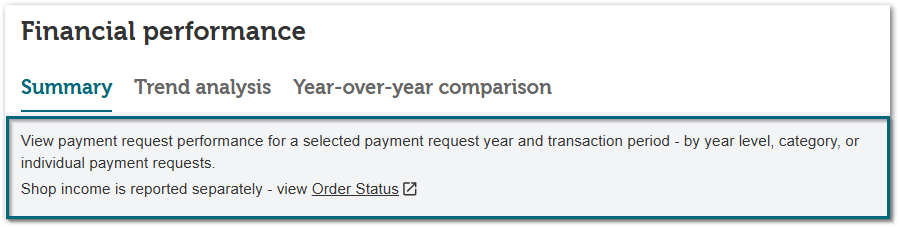
For Kindo Payable schools, the Financial performance report now shows a note that shop income is reported separately on the Order status page, with a direct link. It's a helpful reminder to include shop income in your reporting.
Unlimited stock items now show on the Stock levels tab
Order status
Unlimited stock items appear on the Stock levels tab when you tick Show all (including unlimited stock). You can switch an item to limited and set its stock level right here, without needing to log in to the Partner site.
April 2026
A simpler way for families to withdraw funds
Caregiver wallet
We've streamlined how families withdraw money from their Kindo wallet. Smaller balances can be withdrawn straight away, with clearer steps for larger amounts:
- Balances of $1,000 or under can be withdrawn immediately.
- For amounts over $1,000, an identity check is required, and our Support team helps with the rest. There's no charge for this check.
- A $2 fee applies to withdrawals.
- Families enter an account holder name and confirm the bank account is theirs before submitting.
A simpler process should mean fewer queries, but if one comes up, you've got the facts on hand.
March 2026
A refreshed Point of sale page with a new Additional Payer feature
Point of sale
We've refreshed the Point of sale page and added the Additional Payer feature, so you can take payments from non-caregivers like grandparents or family friends. The receipt goes to whoever actually paid, so they can claim their donation tax credit directly.
See Add a payer on the POS page for how to set one up.
School names now appear on PDF labels
Labels
School names now appear on PDF labels, matching the 8-per-page format. This makes it easier to identify labels at a glance.
Label list now available on the Labels page
Labels
Suppliers can now export the label list as a PDF from the Labels page in the Delivery dashboard, an easily accessible checklist for picking and packing orders.
A fresh look for the Kindo (seed) roll page
SMS
The Kindo (seed) roll page has a cleaner look, and now shows a "Left" label on students who have left the school, so you can easily tell them apart from current students.
Pop-up messages stay on screen longer
Platform
Pop-up notifications, like the confirmation you see after saving a change, now stay on screen for 7 seconds instead of 2. This gives you and your families more time to read them.
February 2026
Xero integration now available to shop-only schools
Xero
Xero integration is now available to shop-only schools, not just those on Kindo Payables, at no additional cost. This helps streamline your accounting. Contact the Support team to get set up, and the Xero card will appear on your admin home page.
Filter Payable status by year
Payable status
You can now filter Payable status by year. This makes it easier to follow up on older payables, sending payment requests for those still unpaid, or to retire those no longer current to keep the page manageable.
Filter Financial performance Summary by year
Reporting
On the Summary tab of the Financial performance report, you can now choose any year with payment requests, not just the current one, using the new Payment request year filter. The date range filter has also been renamed Transaction date range, making it clearer that it relates to when payments were made.
2026 added to Financial performance Year-over-year comparison
Reporting
On the Year-over-year comparison tab of the Financial performance report, 2026 is now available as a Base period, letting you compare this year's payment performance against previous years.
The Admin support portal is easier to spot
Platform
The Admin support portal launcher is now larger and purple, making it easier to get instant help and answers when you need them.
Cleaner labels and production lists for multiple profiles
Labels
If you supply under more than one profile, these now combine fully on your labels and production lists, and labels fill each page before moving to the next school. You'll save time and use less paper.
School name added to 8-per-page labels
Labels
The school name now appears on 8-per-page labels, alongside the existing logo. This makes it easier to identify the right school, especially if you're new to Kindo or supply more than one school.
Export a print-friendly production list
Labels
You can now export a print-friendly version of your production list, ready to print for the kitchen.
Spot accounts blocking payment request emails
Payable status
On the Payable status page, if an invalid email address stops a payment request from being sent, you'll now see an alert showing which account is affected. You can correct it in your SMS yourself, without needing to contact the Support team.